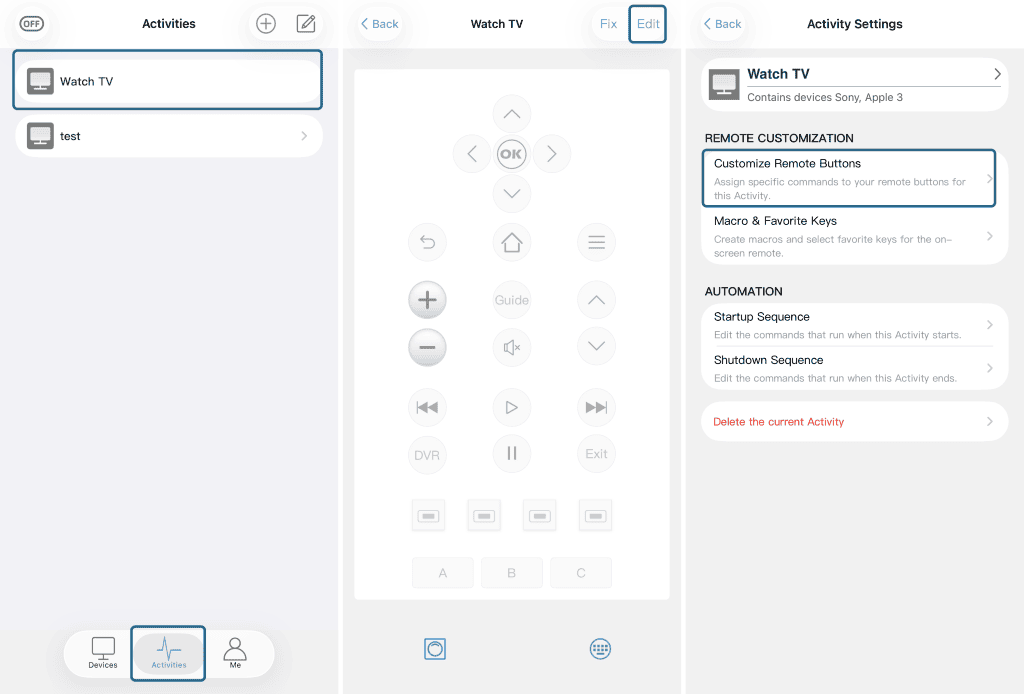
Yes, SofaBaton supports both long-press and short-press functionality. To configure these features, please follow these steps in Activity Mode:
1. Create an Activity
Set up a new activity containing either a single device or multiple devices. For guidance, see our tutorial video at 17:31: Activity Setup Tutorial
2. Edit Activity Keys
Select your activity and click “Edit”.
3. Select Control Type
Choose either:
*“Customize Remote Buttons” (for physical buttons)
*or “Macro & Favorites Keys” (for on-screen controls)
4. Configure Press Actions
Choose your desired keys and assign either long-press or short-press functions.