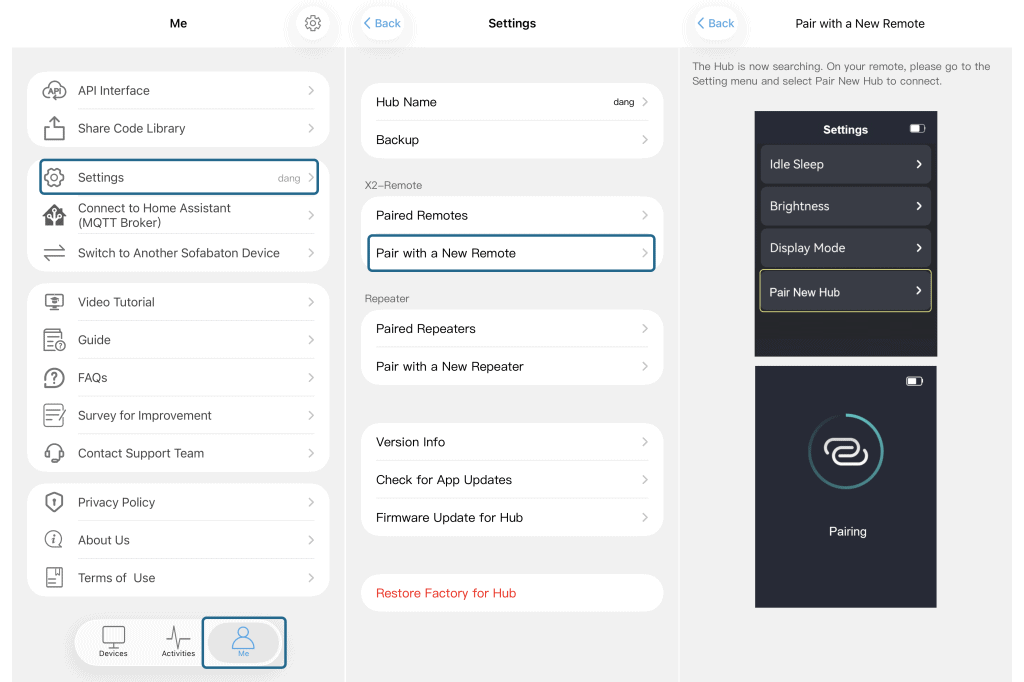
1. Open the Sofabaton app on your mobile device and connect to your Hub.
2. Tap on “Me” (usually located at the bottom right corner).
3. Go to “Settings” in the Me section.
4. Select “Pair with a New Remote”.
5. Follow the on‑screen prompts in the app.
6. On your X2 remote control, navigate to “Settings”.
7. Find and select “Pair New Hub”.
Wait for the pairing process to complete.
Once finished, your second remote should be successfully connected to the X2 hub.